- Root and boot partitons (SSD), and hard drive are automatically mounted on startup using the fstab file
- Hard drive allocates space for a swap file
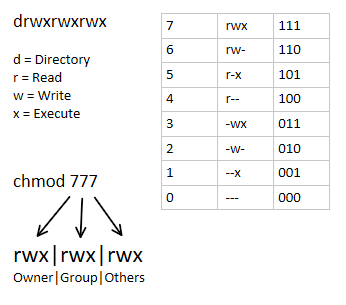
- (There's an image at the bottom of the page about permissions for reference)
- Specific directories exist as a user, and belong to a group
- Some Docker containers utilize UID/GID mapping to set ownership.
- Meanwhile, other containers are granted more system privileges than the rest
- In general, permissions typically aren't granted for others
- Three bash scripts are dedicated to updating ownership and permissions for the script and log, media, and Docker container directories.
- These scripts are automated with Cron
- They're configured to append their output to a log file
- And scheduled to run at every hour, but spaced out by 5 minutes. So the second and third script will run at the 5 and 10 minute mark at each hour
- Caddy acts as a reverse proxy
- It also provides internally signed HTTPS for any Docker containers specified in the Caddyfile
- These containers are defined in the Caddyfile with their own .home domain.
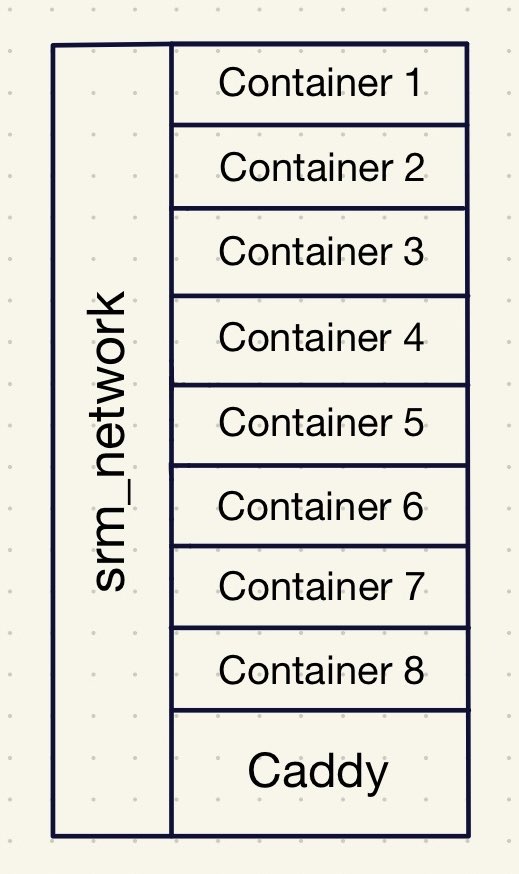
- I feel like the best way of visualizing my Docker setup with Caddy is by using the apartment or hotel analogy:
- Receptionist (Caddy):
- Caddy listens for requests on port 80 (HTTP) and 443 (HTTPS) from containers listed in the Caddyfile
- (In Pi-hole, there's local DNS records for each of the .home domains. The records basically direct the domains to my home network's IP)
- Elevator (srm_network):
- The Docker bridge network connects all of the containers together. Allowing them to communicate with each other
- Docker Containers (Apartment/Hotel Rooms):
- They're self contained, so they can only be contacted through their port number. Similar to a door. Otherwise, they operate separately from each other
- All of the domains use HTTPS instead of HTTP because Caddy internally signs each of my domains using its own private certificate authority (CA)
- This provides end-to-end encryption without having to expose services to the internet
- CrowdSec processes logs from auth.log, or the access logs for all system related activities. It makes decisions based on suspicious activity related to things like failed SSH attempts
- An acquis.yaml file is used to direct it to the the auth.log
- Utilizing CrowdSec means it'll identify IPs that should be banned in its decision list, but it doesn't mean it'll actually take action (It took me awhile to realize this)
- That's why I've implemented CrowdSec's Firewall Bouncer.
- CrowdSec Firewall Bouncer is not in a Docker container, it's on the host, or this server
- The Firewall Bouncer bans IPs on the decision list and community blocklist (CAPI) by adding it to the nftables
- (At the beginning of the year, I did a serious overhaul of my server by switching to bind mounts and using specific image versions instead of the latest)
- Type of volume: bind
- Creates a bridge between the host and container directories
- Permissions are handled by me instead of Docker, so they're not stored within /var/lib/docker
- For example, the media directory might look like /directory/directory/media, but inside of the container it's /data. So the bridge exists between the media and data directory
- Switched to specifying the image versions because I found it difficult to identify what version I was using
- This makes backup and version control much easier
- I try to use the most recent stable version for each container
- Configured Diun to check for updates
- Docker Registry is sometimes used to store the container images
- This doesn't include the volumes, or configuration files (e.g. docker compose, Caddyfile, etc). It only includes the software environment (e.g. OS, dependencies, plugins)
- It's helpful whenever you need to revert to an older image, especially if the version was deleted
- It works by creating tags and pushing them into the registry. Then when you want to revert, you replace the image version with the tag name in the docker compose
- I utilized a bash script and Cron to create a backup system
- The goal was to backup all of my Docker containers because if a new image were to corrupt the data, I'd be so screwed depending on the container and have to start over. It would be super annoying
- Rsync reduces redundant data and the amount of disk space being used by only copying new changes while also mirroring the unchanged data
- If the backup folder isn't empty, it'll either copy with rsync or create a hard link if there's no change
- This script is scheduled to run everyday. If there's 7 existing backups, it will automatically delete the oldest backup after creating the 8th backup
Information + Terms
- Fstab: a configuration file, located in /etc/fstab, which is used to automate the mounting of persistent storage and swap space at boot
- Persistent storage: storage that is non-volatile, or able to retain its data even when there isn't any power
- Swap file: a file which acts as a placeholder for allocated space used by the RAM when it's at full capacity
- Cron: a Unix utility which automates the execution of cron jobs at specified interval, or time in the crontab
- UID/GID → user/group ID
- Caddy: a web server with the ability to serve as a reverse proxy, and sign HTTPS using Let's Encrypt or it's own private CA
- Docker: tool or platform used to containerize applications
- Reverse proxy: a server which intercepts incoming traffic, guilding them to their respective ports.